Read the analytics in the order decisions happen
The analytics page is most useful when you read it in order. Start with link opens, readers and sessions. Then move to full reads, CTA clicks and downloads. After that, use page reach, time on page, version changes and A/B variant comparison to decide what to change in the document.
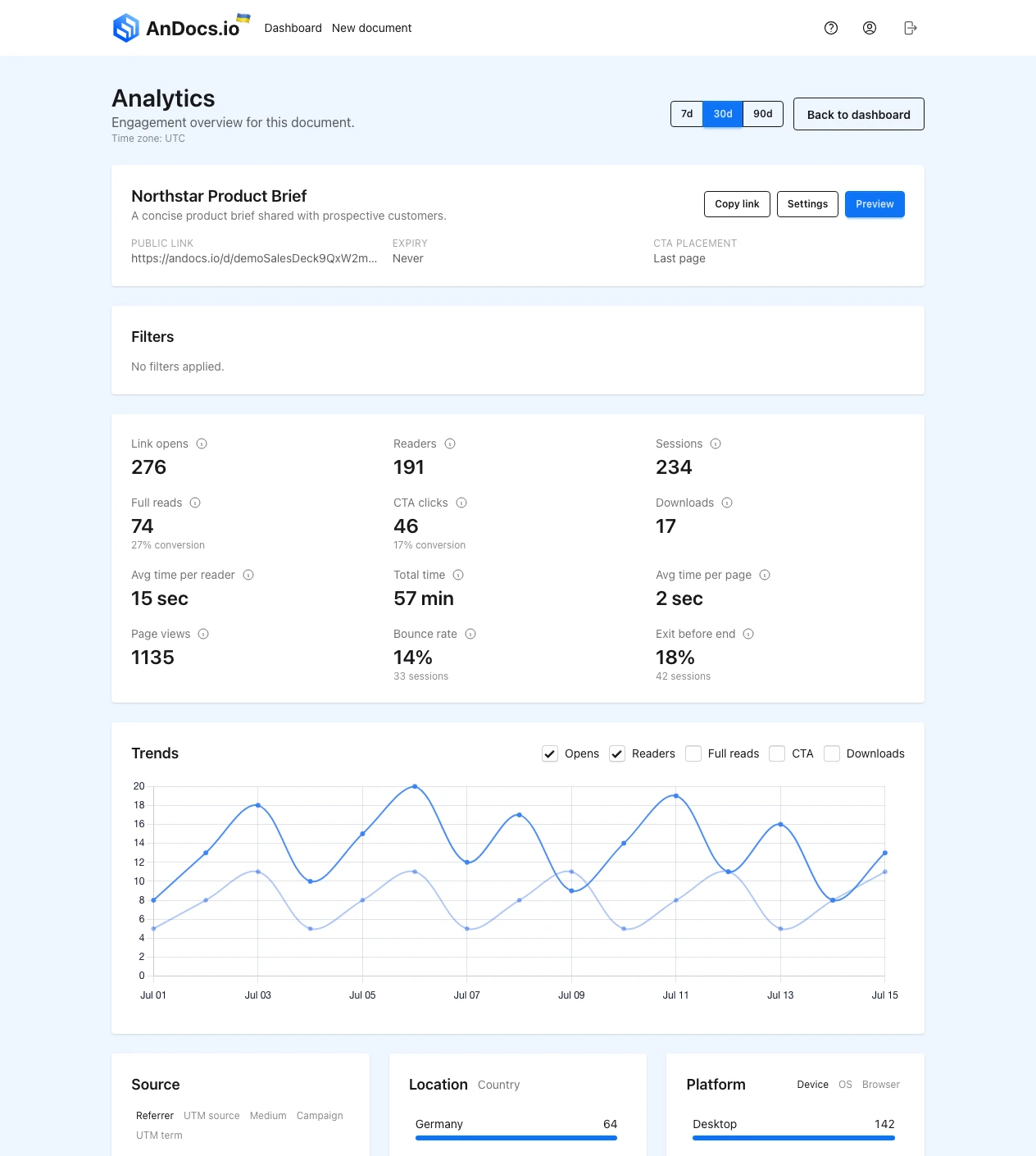
Start with the top metrics
Link opens
Use link opens to measure reach. This tells you how many times the public link was opened in the selected range.
Use it for:
- send volume
- channel reach
- top-of-funnel comparison between campaigns
Do not use it alone to judge the document itself. A weak opening page can still get many opens.
Readers
Readers are sessions with meaningful activity such as 10 seconds or more, a page view, a CTA click or a download. This is the first quality filter after raw traffic.
Use it when you need to tell the difference between "someone touched the link" and "someone actually reviewed the document".
Sessions
Sessions are unique viewing sessions. This is the base for bounce rate and exit before end.
When sessions and link opens are close, most people opened the link once. When opens are much higher than sessions, the same audience may be returning or refreshing.
Full reads
Full reads are sessions that reached the last page. This is the cleanest completion signal for proposals, onboarding guides and long review docs.
It does not mean agreement. It means the document carried the session to the end.
CTA clicks and downloads
CTA clicks show how often the next-step action was used. Downloads show how often people wanted a local copy.
CTA clicks are usually stronger than downloads when the document is supposed to drive one clear next action. Downloads are still useful, but they often mean "take this into another workflow" rather than "I am ready now".
Good CTA use cases:
- sales deck with a call booking link
- proposal with an approval or reply step
- onboarding guide with a setup page or workspace step
If the document is mainly for review, forwarding or offline reading, downloads can matter more than CTA clicks. Do not force every document into a button-driven workflow.
Avg time per reader and avg time per page
Use these to add context, not as the first decision signal.
- average time per reader helps you see depth per session
- average time per page helps you see whether one section was skimmed or actually read
Longer time is not always better. Fast understanding can be a good outcome.
Page views
Page views are total viewed pages, not unique sessions. More page views can mean strong interest, rereading or confusion, so read this together with page reach and time on page.
Bounce rate and exit before end
Bounce rate shows sessions with little activity. Exit before end shows sessions that ended before the last page.
Use bounce rate to judge the opening. Use exit before end to find where a longer document stopped carrying people forward.
Then read the lower sections
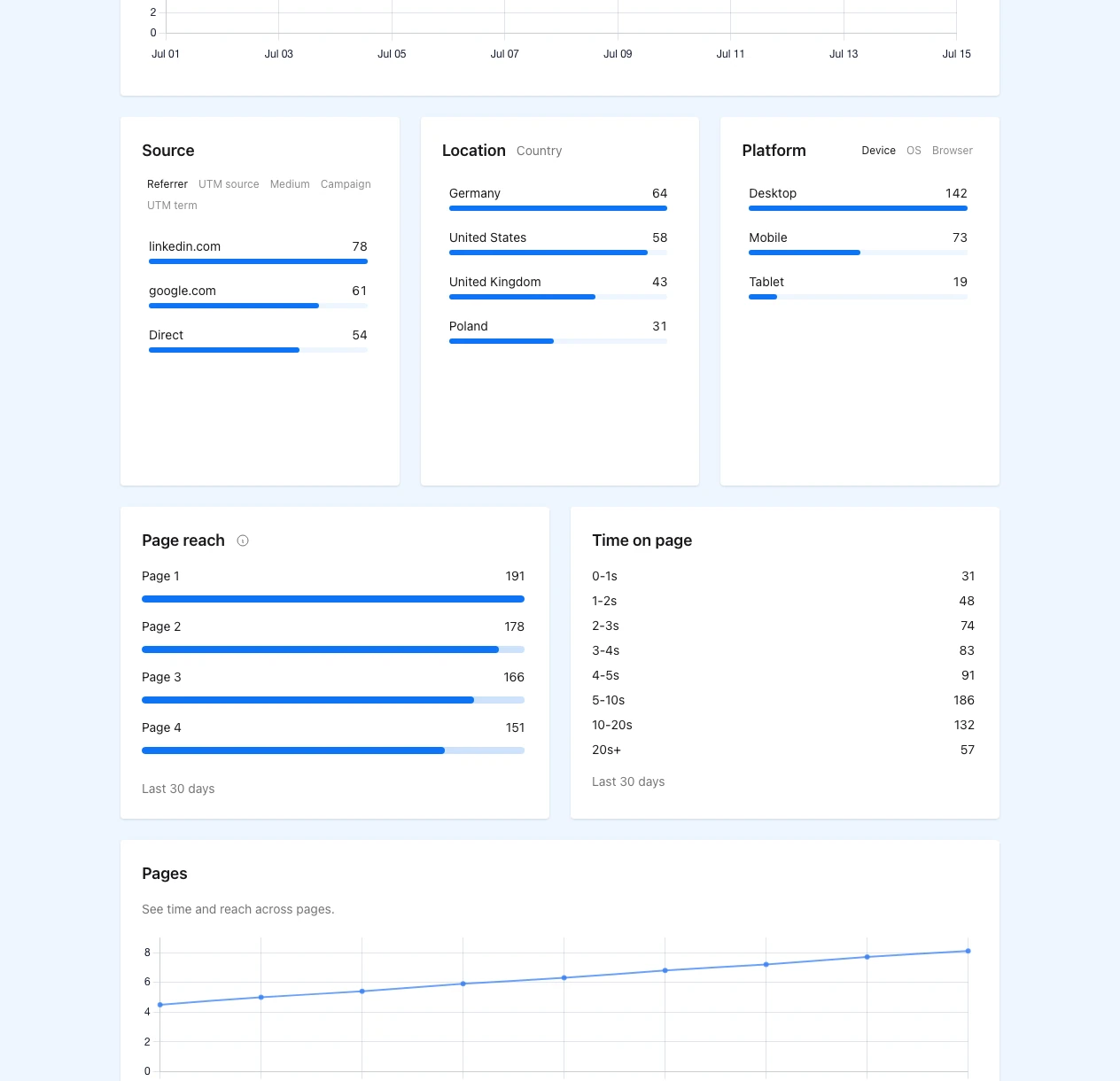
The lower half of the analytics page answers the "why here?" question.
Trends
The trend line shows whether attention came from one send, stayed steady over time or changed after a new version went live.
Version changes in this range
The orange version markers matter when you replace one variant or publish a new file in the same slot. They tell you where the data changed, so you do not compare pre-update and post-update behavior as if it were one unchanged document.
A/B variant comparison
Use the variant comparison chart to see whether one active variant consistently pulled more sessions than the others. Then confirm the decision with readers, full reads and CTA clicks. A single spike is not enough on its own.
This is also where slot-based A/B testing stays readable. One public link stays the same while the analytics still shows which active file did better.
Page reach and time on page
Page reach shows how many sessions reached each page at least once. Time on page shows whether people spent real attention there.
That combination is usually the fastest way to find the first real breakpoint:
- strong early reach and weak mid-document reach means the structure loses people
- strong reach and high time on one page usually means decision point or friction point
- weak reach before pricing or proof means readers never even got to the section you care about
Source, location and platform
Use these after you understand document behavior itself.
Good uses:
- compare newsletter traffic with LinkedIn traffic
- check whether mobile readers drop earlier than desktop readers
- see whether one partner source brings stronger completion
Bad use:
- blaming the channel before you check the page where readers stopped
That matches the broader usability point from recognition over recall: the flow should make the next step obvious in context instead of forcing the reader to reconstruct it later.
How to read A/B tests and version updates
When A/B testing is active, read the result in this order:
- Check which variant got enough sessions to be worth comparing.
- Compare readers and full reads, not just opens.
- Check CTA clicks or downloads only after the document earned attention.
- Use page reach to find where one variant starts losing people.
- If you replace one weak variant, use the version marker to separate old and new data.
This is why one slot and one public link matter. The workflow stays stable while the comparison stays honest.
If you have not started that flow yet, use the A/B setup guide first.
Three practical use cases
Sales deck
For a sales deck, compare:
- readers on the opening pages
- page reach on proof and pricing
- CTA clicks after the pricing section
If one opening gets more readers and stronger CTA clicks, keep it. If it gets more opens but weaker readers, the send worked better than the deck. If CTA clicks stay weak even with strong reads, the deck may be doing its job while the next step is still too vague.
Proposal review
For proposals, page reach around proof, rollout and pricing usually matters more than raw traffic.
If readers reach pricing fast and then exit before the end, the proposal may be asking for evaluation before it built enough confidence. If one variant keeps stronger reach through rollout and still gets CTA clicks, that is usually the better structure. In this flow, CTA clicks help confirm that the proposal did not only get read, but also moved the buyer to a concrete next step.
Onboarding guide
For onboarding, watch full reads, page reach on the first setup steps and time on page around dense explanation sections.
That fits older NNGroup reading research: people often scan long content, so structure has to carry them quickly to the action pages.
If the short guide gets more full reads but weak reach on setup pages, it may be too compressed. If the long guide loses people before setup starts, the opening path likely needs to tighten. If readers reach the setup section but do not use the CTA, the guide may explain the task but still fail to make the next action feel immediate.
What to do next
Use the first upload guide if you still need the basic publish flow. Use the A/B guide if the next job is comparing variants, keeping one slot password or replacing one weak file without changing the public link.