The screenshots use demonstration data
The analytics screens below come from the AnDocs demonstration document. The numbers are fixtures used to show the interface. They are not a customer case study and they do not support a claim about conversion rates.
That distinction is a useful place to begin. Sales deck analytics records events inside a document viewer. It can show that a link opened, a page was reached or a button was clicked. It cannot show who made a buying decision, why someone paused or whether a second session came from the same person.
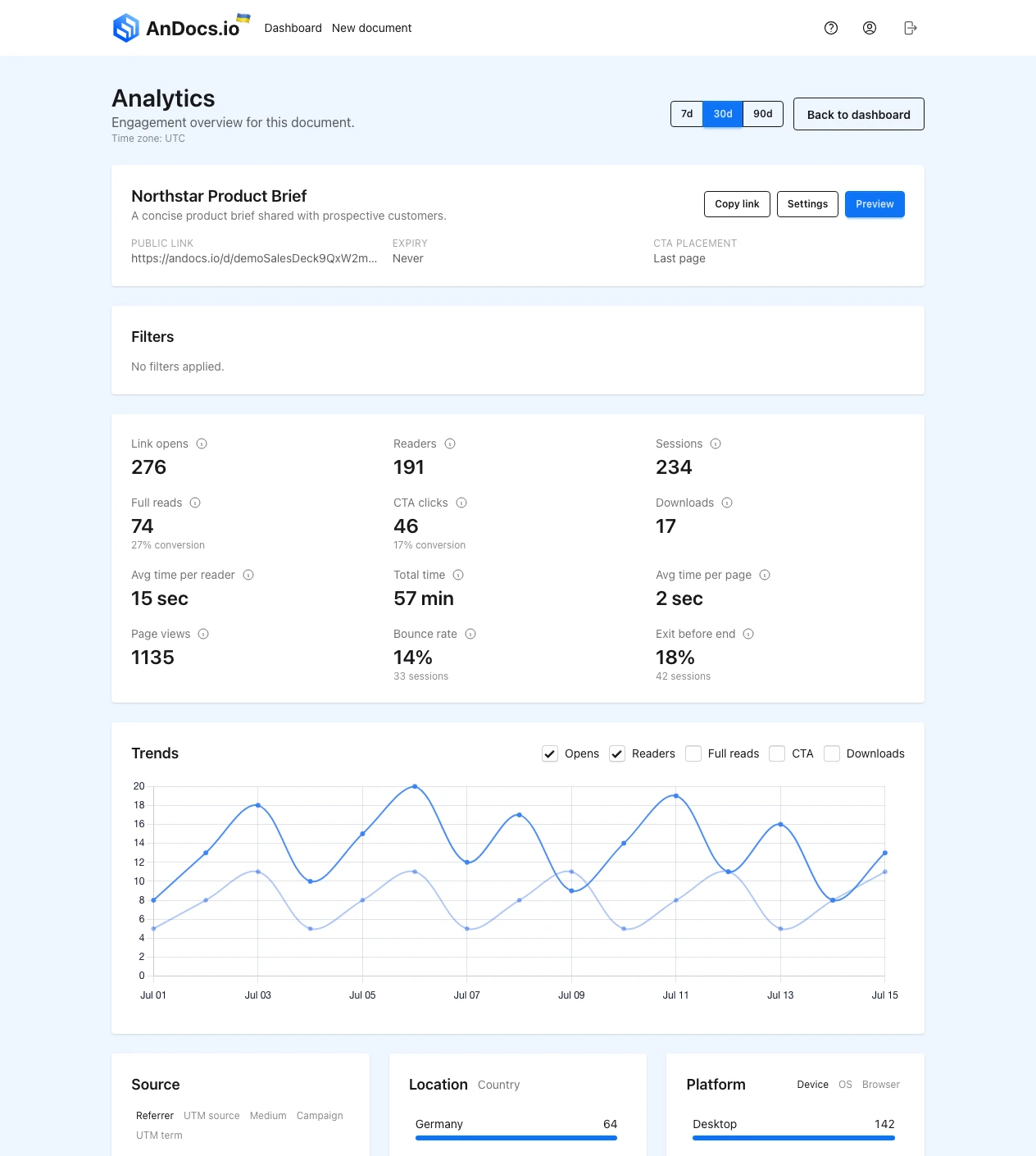
The overview separates link opens, readers and sessions because they answer different questions. An open is an access event. A reader is the privacy-preserving visitor grouping used by the report. A session is a period of activity. None of those labels is a verified human identity.
Read the labels before reading the story
The screen contains enough numbers to tempt a sales team into a neat narrative. Resist that for a minute.
- Link opens counts opens of the public document link.
- Readers groups activity for reporting without claiming a known recipient identity.
- Sessions separates periods of reading activity.
- Full reads reports sessions that reached the document's completion condition.
- CTA clicks counts clicks on the configured next-step button.
- Downloads counts use of the download action when downloads are enabled.
- Average time per reader and average time per page summarize recorded active time. An idle tab can still distort time-based interpretation.
These fields describe viewer activity. They do not measure understanding, approval or purchase intent. A full read can come from a careful buyer, a colleague checking the file or the sender testing the public link. A short session can mean low interest, a familiar topic or a page that answered the question quickly.
Use filters and source data to narrow the event set when that distinction matters. Do not convert a filtered set into certainty that the product does not provide.
Page reach is more useful than a single engagement score
The page report shows where sessions reached and how recorded time is distributed. It is often more useful than a combined score because the salesperson can compare the pattern with the actual structure of the deck.
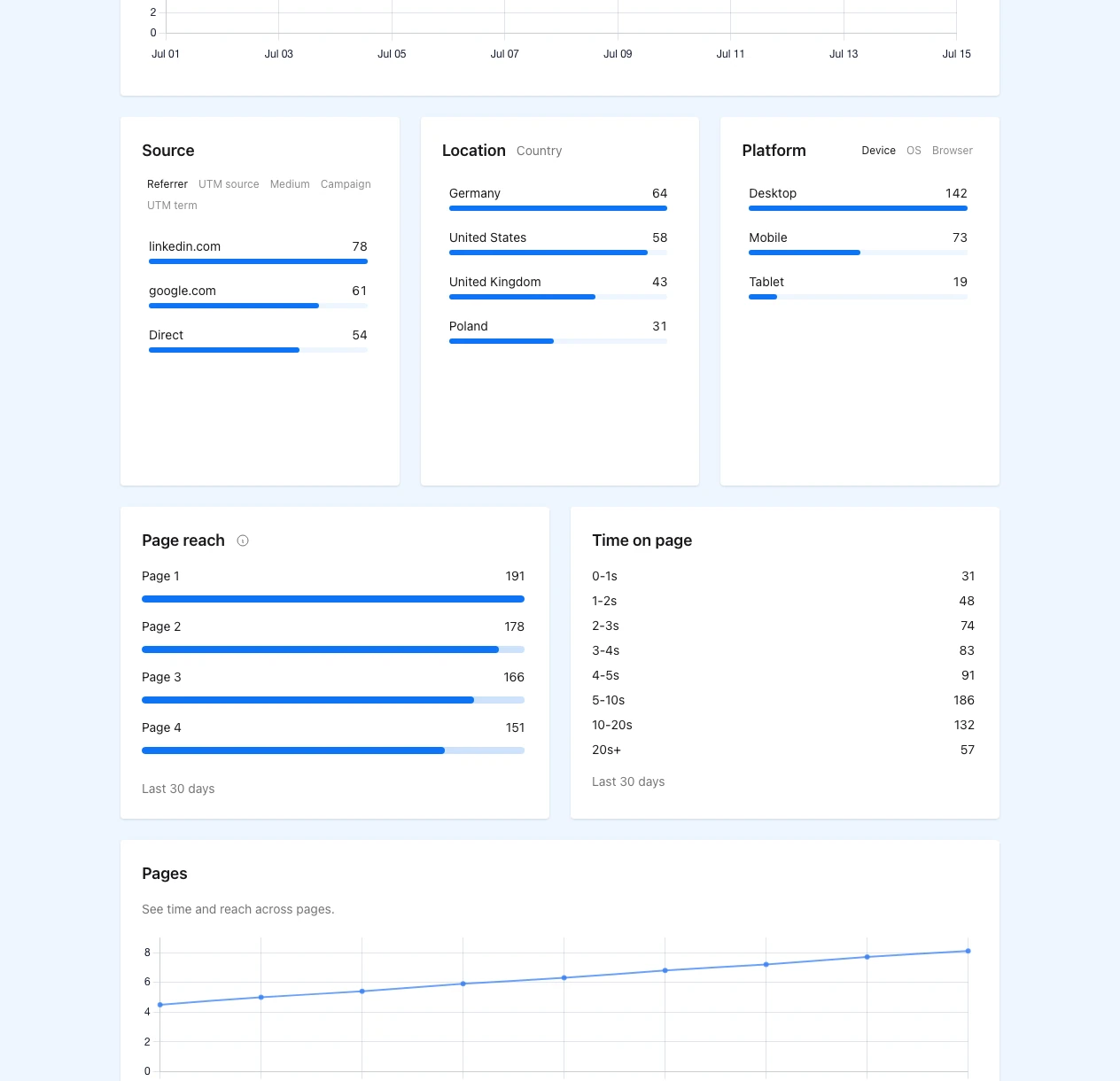
Consider a 14-page proposal with implementation on pages 6-8, pricing on page 11 and security on pages 12-14. If the report shows that page 11 was reached but page 12 was not, two facts are available: the session reached pricing and did not continue to security. "The buyer only cares about price" is not a fact. Neither is "security is not a concern."
The deck itself supplies the context. If page reach falls sharply before a dense implementation diagram, review the diagram. If several sessions reach the CTA page but the button gets no clicks, check whether the action is clear and whether it asks for too much. Those are changes the sender can test without pretending to know the reader's thoughts.
For the mechanics of the report, the separate document metrics guide explains each view and filter.
Let the evidence shape the follow-up quietly
Avoid telling a prospect that you watched a specific page. It can feel intrusive and it overstates what the report knows. Use the activity as private preparation.
For the illustrative page pattern above, a restrained follow-up could read:
I have pulled the rollout assumptions and pricing options into a short recap. If the team is comparing the two launch paths, I can walk through the trade-off on Thursday. I can also send the security notes separately if that review is happening later.
The message makes the likely next decision easier without claiming that the analytics revealed intent. If the session stopped on the cover, sending another attachment would probably add noise. A better reply would ask whether the project is still timely and explain in one sentence why the deck matters.
CTA clicks deserve the same restraint. A click proves that the viewer used the button. It does not prove that the meeting happened, the form was completed or the opportunity moved stage. Check the destination system before updating the sales record.
Test the document, not the person
Choose one post-demo deck that already leads to a clear next step. Keep the page order, headings and CTA stable for several sends. If every proposal has a different structure, the page patterns describe different documents and cannot be compared cleanly.
Before sharing, open the PDF on a phone and a laptop. Give implementation, pricing and security sections headings that make sense without narration. Remove internal filenames from the public view. Keep one next-step action. Then review the report shortly before the planned follow-up instead of watching it as a live notification feed.
When the next call happens, compare the report with what the prospect actually says. Trust the conversation when the two disagree. The mismatch is not a failed dashboard; it is evidence of the dashboard's limit.
AnDocs fits a finished PDF that needs a controlled link, basic access settings and page-level reading context. It is not a deal room, a collaborative editor or a system for verified recipient identity. Sales deck analytics is useful when it helps someone fix a confusing page, write a shorter follow-up or ask a better question. It should not be used to score a person's intent.